
 1K
1K


Tetris - Definitive 8-Bit Line-Clear & Spatial Logic Sandbox
What is Tetris?
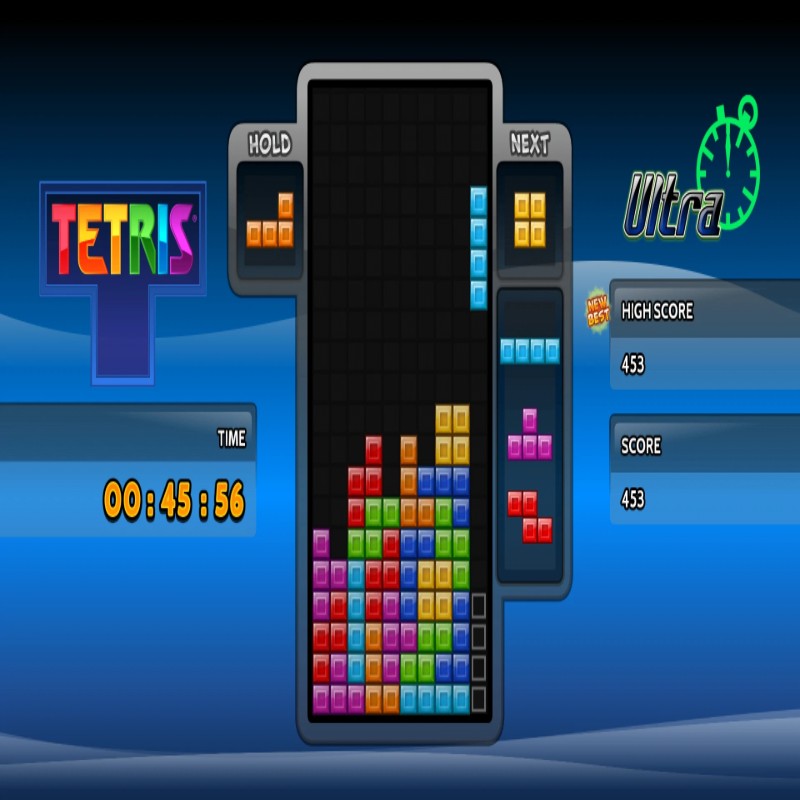
Tetris is the world’s most iconic puzzle game—a timeless geometric masterpiece originally created by Soviet software engineer Alexey Pajitnov in 1984. The gameplay loop centers on absolute spatial organization: players must manipulate a continuous descent of seven distinct, four-block geometric shapes known as Tetriminos (I, J, L, O, S, T, and Z pieces). The goal is to rotate, shift, and drop these blocks to assemble solid, unbroken horizontal lines. Completing a row triggers an immediate line clear, deleting the blocks and dropping the rest of the grid downward to stave off a "Top Out" game over condition. Hosted on the Decent Games portal, this version seamlessly blends classic 8-bit visual aesthetics with modern, competitive performance standards.
🎮 Gameplay Overview
-
The Tetragonal Matrix: The standard playing field operates on a strict 10x20 grid matrix. Success demands continuous spatial mapping to ensure falling shapes interlock perfectly without leaving isolated, unusable dead spaces.
-
Variable Gravity Windows: The pacing of the game scales up dynamically. As players clear increments of 10 lines, the game level advances, increasing the downward velocity (gravity) of the blocks and compressing your strategic decision-making time down to fractions of a second.
-
Modern Scoring Enhancements: Beyond traditional line clears, the underlying engine fully calculates complex placement maneuvers. Pulling off difficult advanced twists—like the legendary T-Spin—or clearing a maximum payload of four lines simultaneously (a Tetris) awards massive point multipliers.
-
Low-Latency Precision HUD: The 2026 preservation build includes highly responsive quality-of-life toggles. Players can activate a Ghost Piece projection matrix at the bottom of the board to trace exact landing coordinates or employ instant Hard Drops to completely bypass slow gravity drops.
🕹️ Official Control Guide (Browser & Desktop)
| Action Matrix | Desktop (PC / Keyboard) | Standard Traditional Mapping | Operational Tactical Placement Focus |
| Shift Tetrimino | Left / Right Arrow Keys | D-Pad Left / Right | Move pieces horizontally across the column grid lanes. |
| Rotate Orientation | Up Arrow / Z Key / X Key | B Button / A Button | Rotate shapes 90 degrees clockwise or counterclockwise. |
| Soft Drop Dash | Down Arrow Key | D-Pad Down | Increase falling velocity to manually accelerate placements. |
| Instant Hard Drop | Spacebar | Core Extension | Immediately snap and lock the active piece into its bottom grid position. |
| Hold Pouch Slot | C Key / Left Shift Key | Accessory Mapping | Swap your current block into a side reserve pocket for strategic later use. |
| System Pause | Enter Key / Esc Key | Start Button | Freeze the matrix clock to adjust interface metrics or audio volume. |
💡 Grandmaster Tactics: Winning Strategies
Build an Asymmetric Stack for the Four-Line Payload 🚀
Do not clear your lines horizontally step-by-step as soon as a single row matches up. To secure maximum score efficiency, you must construct a high-value Tetris setup. Build your block stack evenly across 9 columns, leaving a single, wide column open on the far right or left edge of the matrix. Maintain this open vertical line while piling your blocks up four rows high. The exact millisecond the long, straight I-piece (Line Bar) drops into the queue, slide it down the open lane to clear all four lines at once for a massive points explosion.
Enforce a Flat Stack Surface Geometry 📏
Avoid constructing irregular, jagged jagged pyramids or leaving deep, single-block holes that are more than two blocks deep. A jagged grid surface severely bottlenecks your placement options, as most shapes like the Z, S, or O pieces cannot fit into narrow columns without leaving behind dead air pockets. Keep the top line of your stack as smooth and uniform as possible. A flat surface ensures that regardless of which shape randomizer rolls out next, you will always have multiple viable landing zones available.
Track the "Next" Queue Window Meticulously 👁️
The defining separator between an amateur player and an elite Grandmaster is where they align their vision. Do not keep your eyes locked exclusively on the active block currently falling down the center of the board. Train your peripheral vision to constantly scan the "Next Piece" preview frame on the HUD. Knowing which two shapes are scheduled to drop next allows you to calculate their exact destination grids in advance, executing continuous placement loops without hesitating.
Master the Last-Second T-Spin Twist 🌀
To shatter modern leaderboard scores, you must look beyond basic horizontal drops and internalize the geometry of the T-Spin. This advanced tactic requires creating a T-shaped slot with overlapping overhanging blocks on your board. Guide a standard T-piece into the channel, let it hit the floor, and immediately execute a Rotation command (Up Arrow/Z/X) right before it locks down. The game engine calculates the piece's rotation box, warping the block sideways underneath the overhang to clear lines and award double the points of a standard drop.
🌍 Preservation & Device Compatibility
Play Tetris unblocked securely at work or school via verified Decent Games preservation portals. Powered by an ultra-lightweight HTML5 framework running a streamlined vector layout, the emulator handles instantaneous piece-locking calculations, fluid line-clear flashing animations, and the nostalgic 8-bit "Korobeiniki" chiptune orchestration cleanly at a frame-locked 60FPS. The responsive web container naturally sails around strict educational and corporate network firewalls, serving up low-latency retro puzzle sessions directly inside modern web browser tabs on Chromebooks, standard laptops, and desktop computer rigs with no external downloads required.
![[GAMENAME]](/[BGIMGURL])
 [RATE]