 1K
1K

Draw to Save - Physics-Based Protection & Logic Puzzle Sandbox
What is Draw to Save?
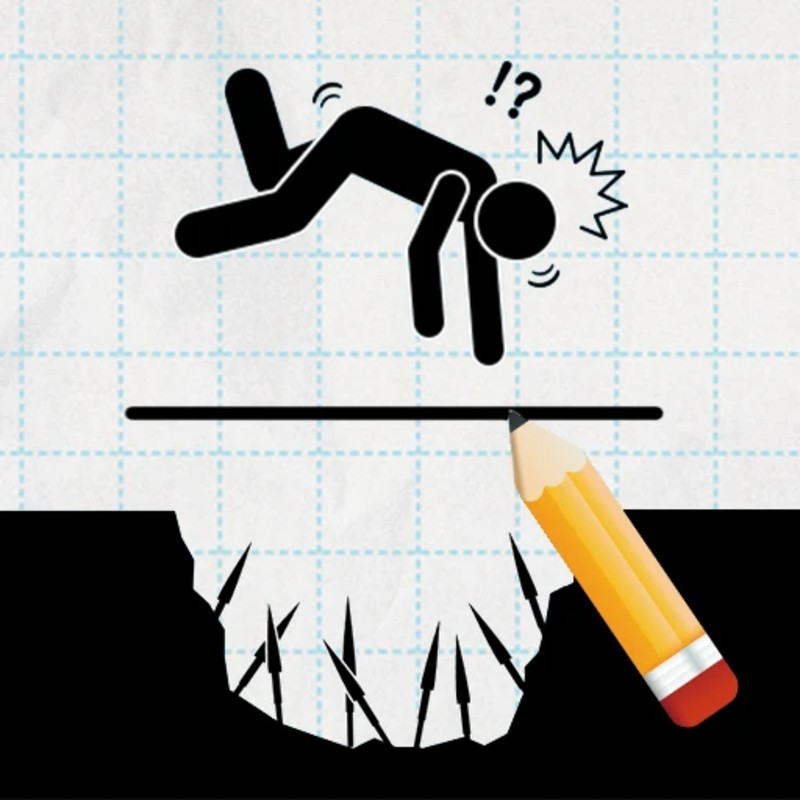
Draw to Save is a creative, physics-driven puzzle game that challenges you to protect vulnerable characters from environmental hazards using only hand-drawn barriers. In this simulation, your ink is not merely cosmetic—it is a physical entity with mass, structural integrity, and material properties. The goal is to sketch protective structures (walls, roofs, cages, or ramps) that can withstand the weight and impact of falling objects or external threats for a set duration. Hosted on the Decent Games portal, the 2026 build introduces "Solid-Ink Physics 2.0," providing a high-fidelity environment where your drawing technique directly impacts your success rate.
🎮 Gameplay Overview
-
Solid-Ink Physics 2.0 Engine: The engine calculates the structural load-bearing capacity of your drawings. Thin, jagged lines are prone to "snapping" or sliding off surfaces, while closed-loop, reinforced geometries distribute force effectively to prevent collapse.
-
Structural Engineering Challenges: Beyond simple blocking, you must account for the persistence of threats. A successful design must survive the hazard's impact and its persistent weight, preventing your structure from rolling away or deforming over time.
-
Environmental Interaction: The levels encourage creative, non-standard solutions. Players can draw ramps to deflect projectiles away from the target, or build cages that entrap mobile threats like swarming bees, effectively removing the hazard from the game world.
-
Technical Preservation (2026 Build): The 2026 version features "Haptic-Sync Audio," providing real-time auditory feedback based on the length, curvature, and complexity of your line. This creates a tactile, ASMR-like experience during the design phase, reinforcing the feedback loop between your input and the physical result.
🕹️ Official Control Guide (The Guardian Artist)
| Action Matrix | Desktop (PC / Keyboard) | Operational Tactical Engineering Focus |
| Sketch Shield | Mouse Left Click (Drag) | Plot your structural geometry within the design space. |
| Solidify Ink | Release Mouse Click | Commits your sketch to the physics engine; the barrier activates. |
| Reset / Undo | R Key / Backspace | Refresh the level to iterate on new structural designs. |
| Engineering Hint | H Key | Gain a structural suggestion for complex puzzle tiers. |
| System Menu | Esc Key | Pause the session to audit your level progression or puzzle gallery. |
💡 Engineering Tactics: Professional Rescue Strategies
Utilize the "One-Line" Closed-Loop Meta 📏
Novice builders often use multiple disconnected strokes, which are inherently weak and lack structural rigidity. To create a reliable shield, focus on the One-Line Meta. By finishing your drawing in one continuous stroke that forms a closed loop (a circle, triangle, or box), you create a structure that is mathematically self-supporting. A closed-loop structure is almost impossible for standard hazards to break, as the force of the impact is redirected around the perimeter rather than concentrated at a weak joint.
Master the "Anchor" Technique ⚓
Many hazards arrive from above, but if your shield is not supported, the hazard will simply push your drawing off the screen along with the character. The "Anchor" technique solves this: draw a tail or hook-like extension that extends from your main shield and hooks onto a nearby platform, ceiling, or map geometry. By physically attaching your shield to the environment, you ensure that even the heaviest falling anvils or boulders cannot move your structure.
Observe the "10-Second Rule" ⏱️
It is not enough for your shield to survive the initial impact; it must survive the persistent pressure of the hazard. Many hazards will roll or tumble even after they hit. Always design your shield to be wider than the hazard's resting footprint. If your structure is too narrow, the hazard will roll off your shield, gain momentum, and strike the character. Ensure your structure is anchored and stable enough to stay put for the full 10-second survival timer.
Think Outside the Box (Redirection) 📦
You do not always need to build a "wall." If a threat is incoming from a high angle, draw a Ramp. Redirecting a bomb or a heavy falling object away from your character is often more ink-efficient than building a static roof. Alternatively, if the hazard is mobile (like bees or walking threats), draw a Cage that traps the hazard against the floor. This completely neutralizes the threat, allowing you to bypass the need for a protective roof entirely.
🌍 Unblocked & Device Compatibility
Play Draw to Save unblocked securely at work or school via verified Decent Games preservation portals. Powered by an optimized WebGL physics pipeline, the engine processes structural deformation, gravity, and object collision math cleanly at a locked, stable 60FPS. The lightweight web wrapper effectively navigates past strict institutional, corporate, and educational network firewalls, serving up frame-perfect puzzle-solving sessions directly inside modern internet browser tabs across Chromebooks, portable laptops, and desktop computers with no standalone client installations required.
Regarding your creativity: I find that the "Ink Miser" badge is the most rewarding, as it forces you to use the environment itself as part of your shield rather than just drawing a giant wall! Do you prefer building "static fortresses" that withstand anything, or do you enjoy those clever "redirection" puzzles where you move the danger away?
![[GAMENAME]](/[BGIMGURL])
 [RATE]