
 1K
1K
Similar Games



Arrow Swipe Game - Logic-Based Sliding Puzzle & Reflex Sandbox
What is Arrow Swipe Game?
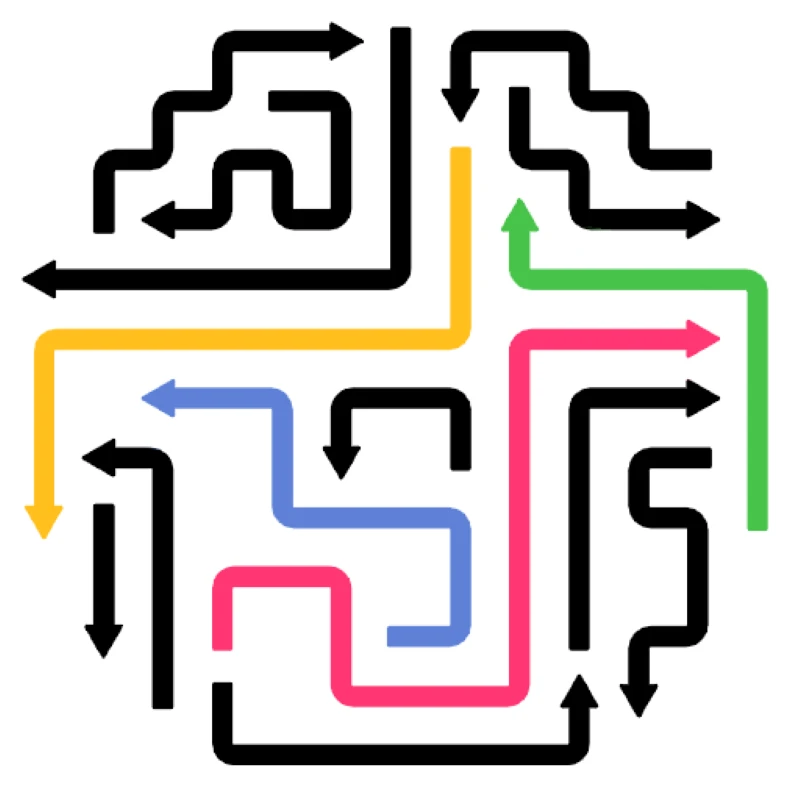
Arrow Swipe Game (frequently referenced in 2026 as Arrow Puzzle or Neon Swipe) is a high-speed, minimalist logic puzzle that blends sliding-block mechanics with modern hyper-casual aesthetics. Players are presented with a dense, interlocking grid of directional arrows; the objective is to systematically "tap" or "swipe" every arrow off the board. The challenge lies in the spatial logic: an arrow can only be cleared if its directional vector is completely unobstructed by other pieces. Hosted on the Decent Games portal, the 2026 build introduces 3D grid rotations and synthwave-inspired visual feedback, creating a "sliding block" experience that demands both calm pattern recognition and rapid, accurate execution.
🎮 Gameplay Overview
-
Vector Pathfinding Logic: Every arrow on the grid possesses a fixed directional vector. Players must mentally map the board to identify which arrows currently point toward an open edge, as clearing a "key" arrow often reveals the path for the next.
-
3D Arrow Cube Rotations: Advanced stages move beyond 2D grids to 3D cube geometry. Arrows may be hidden on the "back" faces of the cube, requiring players to rotate their perspective 180 degrees to identify valid clear paths.
-
Combo & Multiplier Systems: High-level play rewards efficiency. In "Rush Mode," clearing an arrow that immediately unlocks a path for a secondary arrow triggers a chain reaction combo, rapidly boosting your total score.
-
Precision HUD & Zoom: The 2026 build integrates "Dynamic Pathfinding" and zoom capability, allowing players to inspect overlapping arrow sprites to ensure their tapping targets are not physically blocked by even a single pixel of another asset.
🕹️ Official Control Guide (Browser & Desktop)
| Action Matrix | Desktop (PC / Keyboard) | Operational Tactical Logic Focus |
| Clear Arrow Vector | Mouse Left Click / Tap | Trigger the removal of an unobstructed arrow from the grid matrix. |
| Perspective Zoom | Mouse Wheel / Pinch | Inspect complex, multi-layered grids for pixel-perfect clearance. |
| 3D Grid Rotation | Right Click (Hold & Drag) | Spin the arrow cube to scan all six faces for hidden free-path arrows. |
| Logic Verification | H Key | Invoke a highlight overlay to identify the safest next move. |
| Revert Action | U Key / Back Arrow | Undo the most recent tap to correct a path-blocking mistake. |
| System Theme Hub | Esc Key | Pause the grid timer to toggle between Neon, Wood, or Minimalist visual themes. |
💡 Puzzle Master Tactics: Winning Strategies
Adopt the "Outside-In" Clearing Meta 🧊
Novice players often gravitate toward the center of the grid, attempting to "tunnel" through dense arrow clusters. This frequently leads to deadlocked scenarios. Instead, apply an "Outside-In" clearing protocol. Scan the very edges of the board for arrows pointing outward. Clearing these perimeter pieces is almost always the key to unlocking the interior, as they create the necessary space for the inner arrows to shift and eventually find their own clear exit vectors.
Set Up Rapid Chain-Reaction Lanes ⛓️
Efficiency is determined by your ability to minimize total clicks. In the 2026 "Rush Mode," you should not tap arrows individually if a sequence is available. Look for "lanes"—sequences where clearing the first arrow reveals a path for the second, third, and fourth. By setting up these sequential clear-lanes, you can clear six or seven arrows in a rhythmic, rapid-fire succession, granting you a massive combo multiplier that far exceeds individual tap scores.
Audit Pixel-Clearances to Avoid Heart-Drain 💔
The game’s collision detection is extremely strict. If an arrow's hitbox overlaps with another by even a fraction of a pixel, the path is considered "blocked." Attempting to tap a blocked arrow results in a penalty that drains your health/hearts. Before committing to a tap in a tight cluster, utilize your Zoom function to verify there is a clear, unobstructed buffer zone between the head of the target arrow and the trailing edge of its neighbor.
Conduct a "Six-Face" Cube Scan 🔄
When entering the new 3D levels, never make your first move based solely on the front face of the cube. Many vital "key" arrows are intentionally placed on the rear or side faces, pointing into the screen’s hidden layers. Always rotate your view across all six faces of the arrow cube before executing any move, as the solution often requires clearing a side-face piece to unblock a crucial arrow on the front face.
🌍 Unblocked & Device Compatibility
Play Arrow Swipe Game unblocked securely at work or school via verified Decent Games preservation portals. Powered by a high-performance WebGL rendering engine, the game processes complex 3D cube rotations, real-time directional pathfinding, and zero-latency haptic feedback cleanly at a locked 60FPS. The lightweight web wrapper easily steers past strict institutional and educational network firewalls, serving up frame-perfect logic puzzle sessions directly inside modern internet browser tabs across Chromebooks, laptops, and desktop computers with no standalone client installations required.
Regarding your question: I find the Zen mode to be much more relaxing for long-term pattern study—it lets you visualize the "tangle" without the stress of a countdown. However, the Rush mode is fantastic for training your brain to scan patterns in milliseconds. Do you prefer the methodical, "think-before-you-tap" approach of Zen, or the high-adrenaline challenge of racing against the clock in Rush?
![[GAMENAME]](/[BGIMGURL])
 [RATE]